WordPress plugin
Site Offline Pro
Site Offline Pro displays a responsive, retina-ready page while a WordPress site is under construction, being updated, or temporarily offline. Choose a template, personalize the logo, background, colors, and contact information, then review the result in the live preview before enabling offline mode. The layout is designed to work with any WordPress theme.
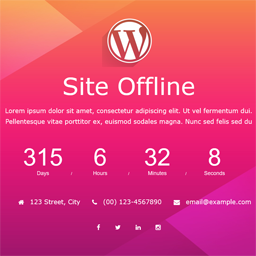
Site Offline Pro displays a responsive, retina-ready page while a WordPress site is under construction, being updated, or temporarily offline. Choose a template, personalize the logo, background, colors, and contact information, then review the result in the live preview before enabling offline mode. The layout is designed to work with any WordPress theme.
Build the page users will see
The Pro edition includes eight styling templates, a countdown timer, a background slideshow, and a YouTube video background. Add About Us, Team, Contact Information, Contact Form, Google Map, and Service pages, then disable sections you do not need. The responsive layout uses Bootstrap and HTML5 with CSS3 animations.
- Customize the logo, background image, colors, and contact information.
- Arrange more than 16 social profile options with drag and drop.
- Choose from more than 500 Google Fonts.
- Use translation-ready i18n support and cross-browser support.
Collect sign-ups and manage access
Seven or more newsletter options include integrations for Mailchimp, Madmimi, iContact, Constant Contact, Campaign Monitor, and GetResponse. A subscribers list lets you manage sign-ups collected through the offline-page process.
Access options include auto launch, IP access, user access, a landing page option, and full SEO control. These settings can help administrators work on the website while visitors see the offline page.
Set up and check the offline page
- Install and activate Site Offline Pro in WordPress.
- Open the plugin settings, select a template, or configure the page sections.
- Add a logo, background, countdown, contact details, social profiles, and newsletter settings as needed.
- Review the page in the live preview, then enable Site Offline mode with the activation control.
To check that the page appears, open the site in another browser where you are not logged in. If an active cache add-on prevents the offline page from appearing, temporarily deactivate the cache plugin and check again.